For owners of 1 to 3 vacation rentals
Sleep as soundly as your guests do.
Your guests get the vacation. With Rentalist, you get the calm that comes with knowing where every dollar stands.
Start your 14-day free trial$79/year. Cancel during the trial and you won't be charged.


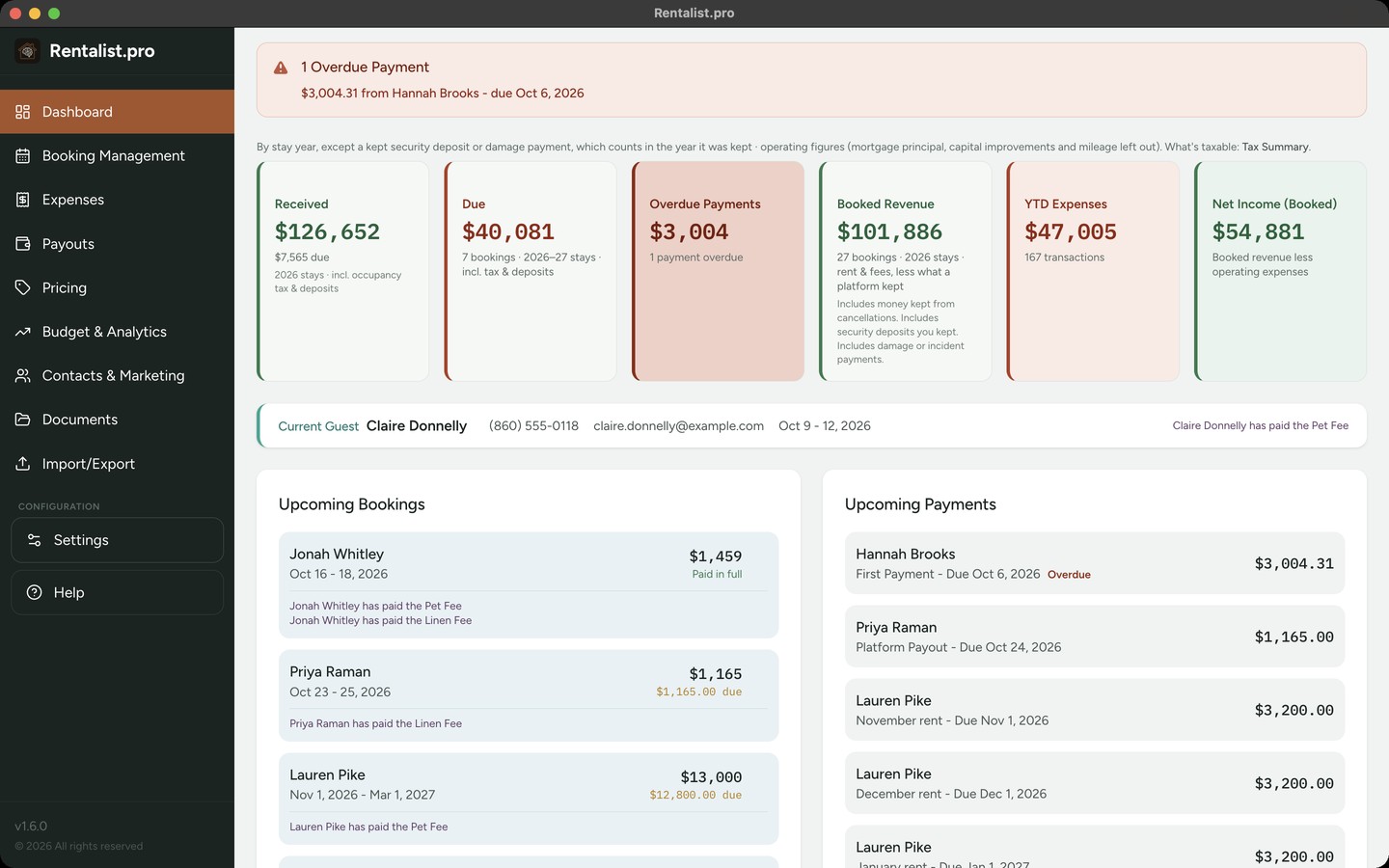
- 1Payments received
Money guests have paid so far this year, with the amount still due underneath.
- 2Expenses this year
What you've spent so far this year, and how many expenses make up that total.
- 3Upcoming payments
The next payments due, with the due date and the amount.
Running a small business needs small business tools.
Many owners start renting to help pay for a place they love, and before long it's a real business. You set the prices, answer the inquiries and welcome guests back year after year, some booking with you directly and some through Airbnb or Vrbo. Rentalist gives that business the financial organization it deserves, beside whatever you already use to take bookings, even if that's email, the phone and a checkbook.
Tax time arrives already sorted
Snap a photo of a receipt or save the PDF, then drop it into Rentalist or email it to yourself. The expense form fills in the vendor, date and total for you to check, and the receipt is filed with your records. It all happens on your computer.
Each expense lands in a category tied to its tax deduction as you go. The mortgage, the insurance and the cleaner after every checkout are set up once and added as they come due. When your accountant asks for the year, the Tax Summary is ready, with capital improvements listed apart.
See how expenses work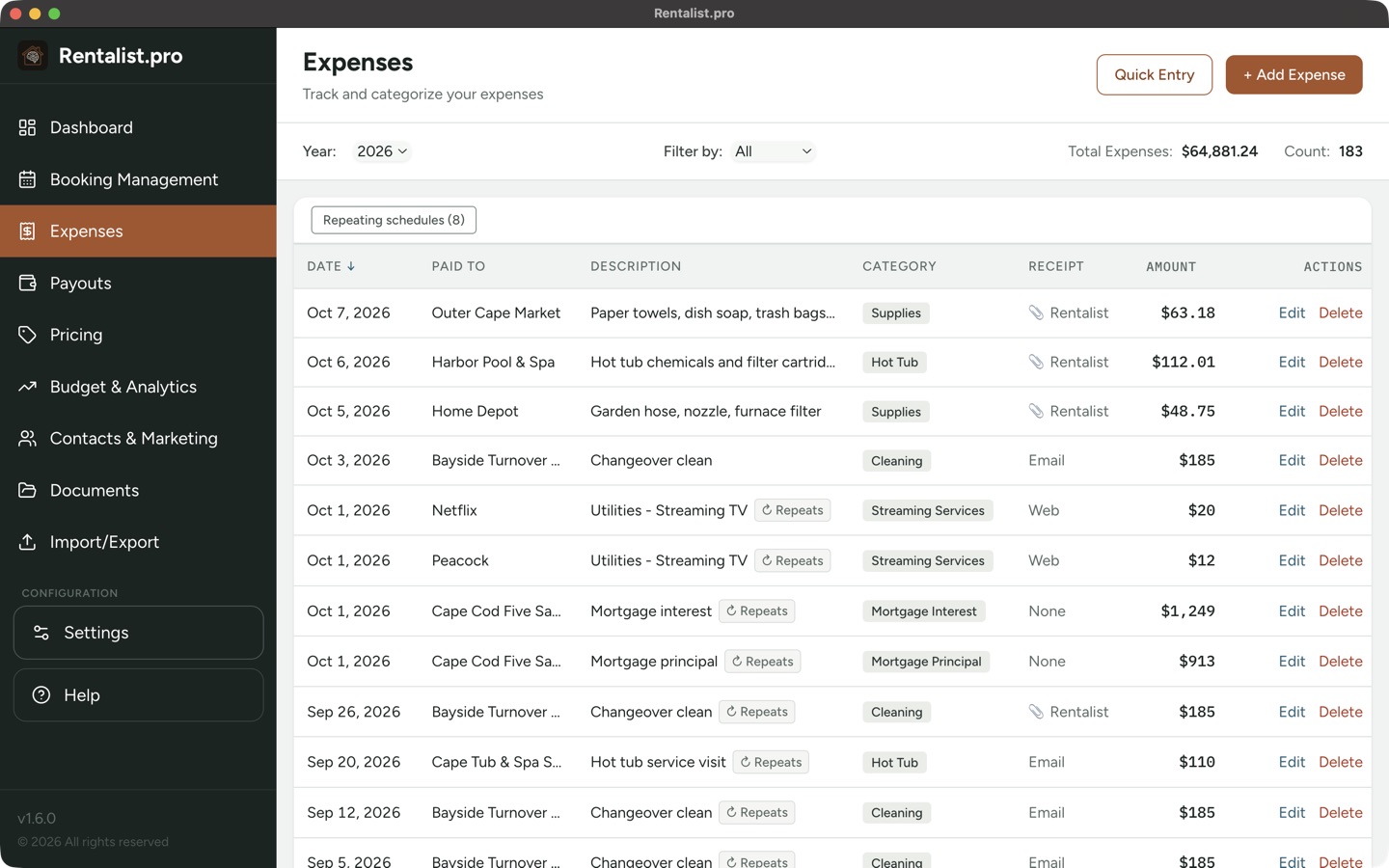
- 1Category
Each expense has a category, such as Supplies, Hot Tub or Mortgage Interest.
- 2Receipt
Where the receipt is kept: on paper, by email, on the web, or filed in Rentalist with a clip mark.
- 3Total for the year
The total spent and the number of expenses for the year you're viewing.
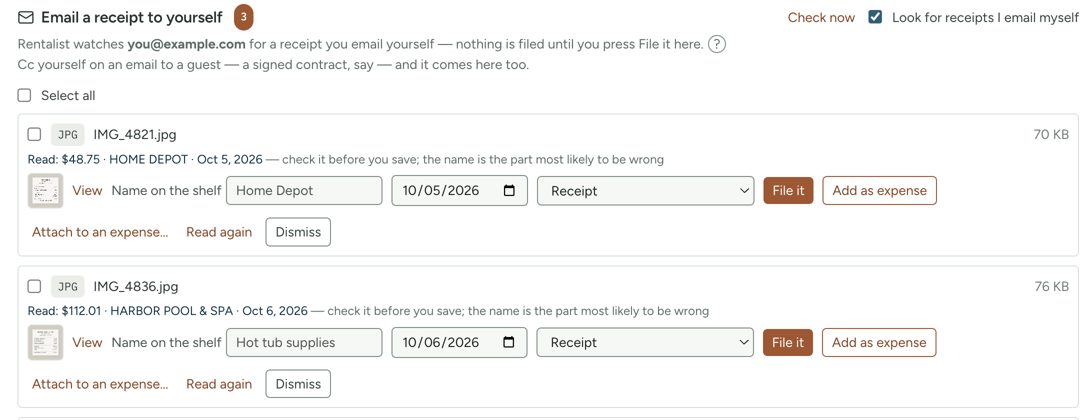
- 4Email yourself a receipt
Take a photo of a receipt and email it to yourself, and it waits here for you to check and file. For receipts, Rentalist picks up only email you send to yourself and leaves the rest of your inbox alone. Nothing is filed until you choose File it.
Every payment accounted for, from deposit to checkout
A guest who books with you directly brings a deposit, a payment schedule, a security deposit and occupancy tax, and Rentalist keeps all of it in that booking's record. You can see at a glance who has paid and who still owes. A late payment shows up on the Dashboard, and you get a reminder before each occupancy tax return is due.
Platform stays go in too, with the payout you expect, and you can check them against the payout files Airbnb and Vrbo provide.
See how bookings work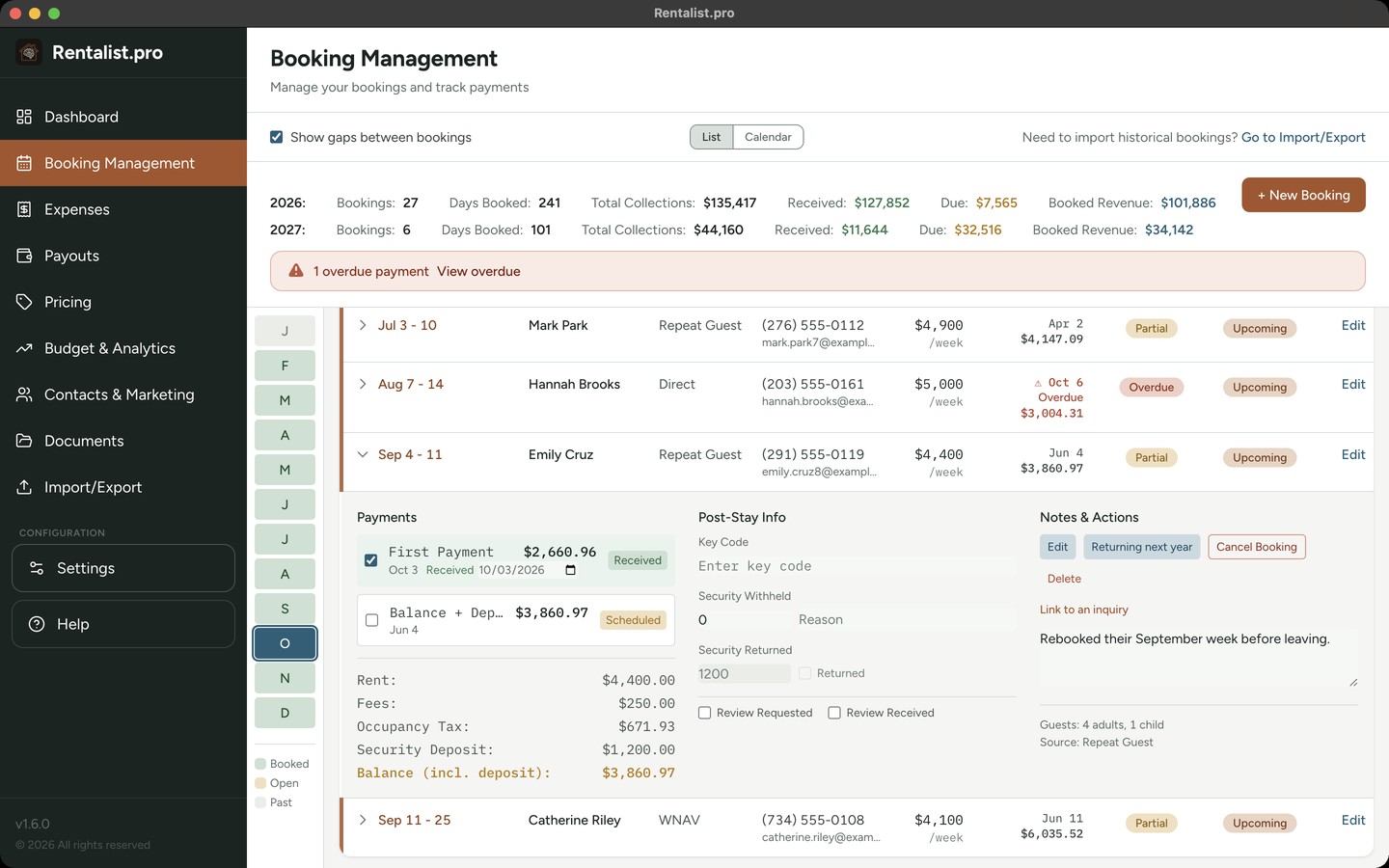
- 1Totals for the year
Bookings, nights booked, total collections, money received and money still due.
- 2One booking's payments
Each payment with its amount and the date it arrived, then rent, fees, occupancy tax, security deposit and the balance.
- 3Status
Whether each booking is paid, at a glance.
See the lean months long before they arrive
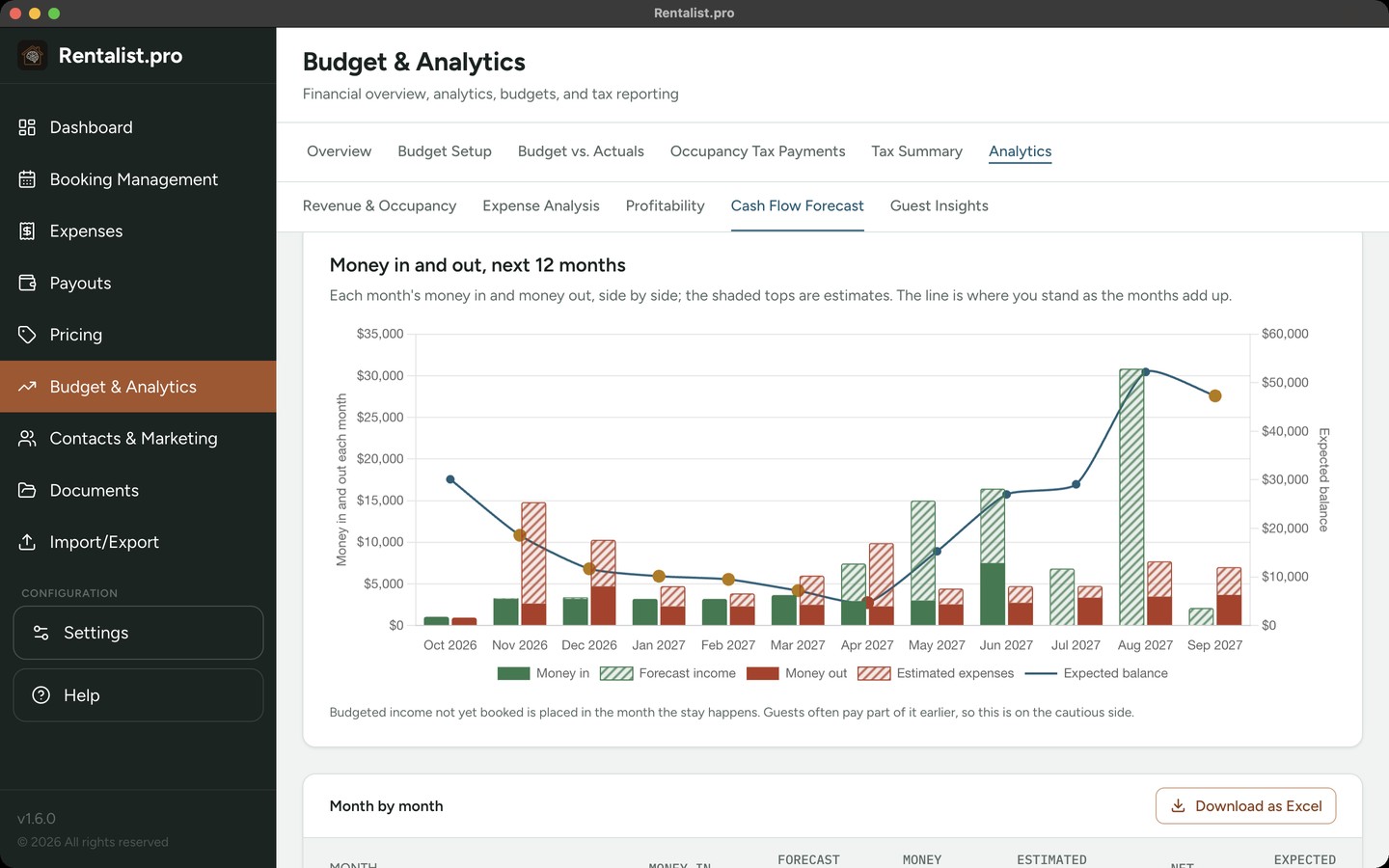
Rental income and expenses can be lumpy. The Cash Flow Forecast lays out the next twelve months of money in and out, and marks the first month your balance would dip below a cushion you choose, so you have a heads up and time to plan. The Dashboard shows where this year stands today, and Budget vs. Actuals shows how it compares with what you planned.
Net what you planned, on every platform
If you have a number you need to make and you give it to Airbnb, you'll make a good bit less after their 15.5% commission. Rentalist works out what to list on each platform, by week or by day, so the number that reaches you is the one you planned on.
Your past guests are your best marketing list. Rentalist keeps each one's stays and contact details, so you can build a mailing list in under a minute and fill next season with people who already love the place.
- You need
- $4,800
- Airbnb's 15.5%
- +$881
- List it at
- $5,681
Your records stay with you, on your own computer
Your bookings, guests and finances live in files on your computer. Rentalist never links to your bank and never sends your records to us or anyone else. There is no AI inside Rentalist. It goes online only to:
- check your subscription
- check for a new version, if you bought it here
- read booking emails and emailed receipts from your own mailbox, if you turn that on
Everything included, for $79/year
Every feature, for up to three properties. No tiers, no add-ons, no per-property fees. During your trial, take a look at sample data and see every screen working before you enter a thing.

Rentalist was designed by a vacation rental owner with years of experience managing a single property on Cape Cod, and years of frustration managing its finances with tools that weren't perfect for the job. That's who will answer your support emails.
Recommended
$79/year
- Free trial
- 14 days
- Works on
- Mac and Windows; your license moves between them
- Billed by
- LemonSqueezy
Mac App Store
$79/year
- Free trial
- 14 days
- Works on
- Mac only
- Billed by
- Apple
Microsoft Store
$79/year
- Free trial
- 1 week
- Works on
- Windows only
- Billed by
- Microsoft
Cancel during the trial and you won't be charged. macOS 11 or later · Windows 10 or later.
Run your rental like the business it is.